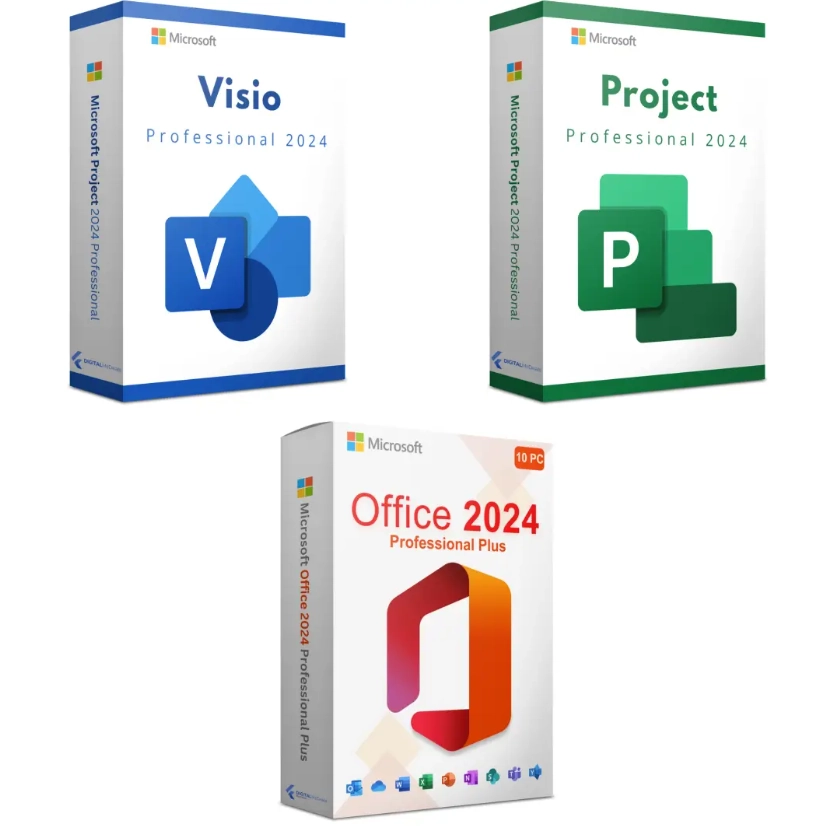
Microsoft Office 2024 Pro Plus + Visio 2024 + Project 2024 – Ultimate Bundle for 1 PC
$78.00Original price was: $78.00.$29.49Current price is: $29.49.
-62%
Genuine Office 2024 Visio and Project bundle for 1 Windows PC: three separate keys for Office 2024 Professional Plus, Visio 2024 Professional and Project 2024 Professional in one email. Emailed within minutes, 30-day money-back guarantee.
This Office 2024 Visio and Project bundle equips one Windows PC with the complete Microsoft desktop toolkit for people who manage work as well as do it: Office 2024 Professional Plus (Word, Excel, PowerPoint, Outlook, OneNote, Access), Visio 2024 Professional for diagrams, and Project 2024 Professional for schedules and resources. Project managers, engineers, architects, business analysts, IT administrators and consultants buy it to replace three separate purchases, or three separate subscriptions, with one order.
License details
Contents: three separate 25-character keys, one each for Office LTSC Professional Plus 2024, Visio LTSC Professional 2024 and Project LTSC Professional 2024, in one email
Platform: Windows 11 or Windows 10, 64-bit recommended, Windows only; all three products install side by side
Covers 1 PC; each key activates once, on the same computer
License term: all perpetual, one-time purchase, no subscription; the 2024 LTSC releases are supported by Microsoft until October 9, 2029
Activation: each product through its own File, Account, Change Product Key screen; phone activation help from our team when Microsoft requests it
Delivered: three keys, the official Microsoft download links for each product and a short guide, also saved under My Account
Language: multilanguage installers for all three products
Support by a person 7 days a week; 30-day money-back guarantee on every key
Place the order, and within minutes the email with all three keys is in your inbox, ready to install the same day. Nothing is shipped and nothing renews. If any key cannot be activated and our team cannot fix it, our 30-day money-back guarantee replaces or refunds that key. The license type of each product is shown in the Product Overview table on this page.
Product overview
Product
Microsoft Office 2024 Pro Plus + Visio 2024 + Project 2024 – Ultimate Bundle for 1 PC
Brand
Microsoft
Category
Microsoft Office, Office 2024
Platform
Windows PC
Covers
1 PC
License term
One-time purchase, no subscription
Delivery
Digital, product key by email within minutes
You receive
Product key, official Microsoft download link, installation guide
Support
Free installation and activation help by email, 7 days a week
Guarantee
30-day money-back guarantee
SKU
SIS-B24-OVP
Office 2024 Visio and Project bundle: the full Microsoft toolkit for one PC
Most professionals who plan and document work end up needing three Microsoft products: the Office suite for documents, spreadsheets, email and presentations; Visio for flowcharts, network diagrams, floor plans and process maps; and Project for schedules, Gantt charts and resource tracking. Bought separately, that is three orders and three sets of paperwork. Our Office 2024 Visio and Project bundle puts all three in one email as three genuine, perpetual keys for a single Windows PC: Office 2024 Professional Plus, Visio 2024 Professional and Project 2024 Professional.
Who buys it? Project managers who need a real desktop scheduling tool rather than a spreadsheet. Systems and network engineers who document infrastructure in Visio. Architects, facility managers and event planners who draw floor plans. Business analysts mapping processes in BPMN. Consultants who must open whatever a client sends, whether it is a .vsdx diagram or an .mpp plan. Small engineering and construction firms that want one fixed cost per workstation. And students in PMP or engineering programs who want the same tools they will use at work, owned outright.
Software in Store delivers all three 25-character keys, the official Microsoft download links for each product and a short guide by email, usually within minutes of payment. The license type of each key is shown in the Product Overview table on this page.
What each product in the bundle contributes
Office 2024 Professional Plus: Word, Excel, PowerPoint, Outlook (classic desktop client), OneNote and Access. Excel 2024 brings dynamic arrays, XLOOKUP, LET, LAMBDA and TEXTSPLIT; Access covers desktop databases.
Visio 2024 Professional: flowcharts, org charts, network and rack diagrams, floor plans, BPMN 2.0, UML, wireframes and data-linked diagrams that update from Excel or SQL sources; co-authoring on .vsdx files stored in OneDrive or SharePoint.
Project 2024 Professional: Gantt charts, task dependencies, critical path, baselines, resource leveling, timeline views, cost tracking and built-in reports, with .mpp files that exchange cleanly with other Project users.
Visio shapes and Project data flow into Word reports and PowerPoint decks without conversion, since all three come from the same 2024 release.
Three separate keys, so you can install and activate each product independently and in any order.
All three are the LTSC 2024 builds: fixed feature sets, security updates until October 9, 2029, no subscription.
Official Microsoft installers for each product through the links in your delivery email.
Publisher is not part of this bundle because Microsoft retired it with the 2024 release. If you still need Publisher, the Office 2021 Pro Plus, Visio 2021 and Project 2021 bundle is the equivalent set built on the 2021 versions.
How the bundle compares with the alternatives
The table lines this bundle up against buying the products individually and against the subscription route, so you can see what one order replaces.
Option
Office suite
Visio
Project
Access
Payment model
This bundle
Office 2024 Professional Plus
Visio 2024 Professional
Project 2024 Professional
Yes
One-time, three perpetual keys
Office 2024 Pro Plus + Windows 11 Pro bundle
Office 2024 Professional Plus
No
No
Yes
One-time, two perpetual keys
Office 2024 Professional Plus alone
Office 2024 Professional Plus
No
No
Yes
One-time, one key
Visio 2024 Professional alone
No
Visio 2024 Professional
No
No
One-time, one key
Project 2024 Professional alone
No
No
Project 2024 Professional
No
One-time, one key
Microsoft 365 + Visio Plan 2 + Project Plan 3
Microsoft 365 apps
Visio (subscription)
Project (subscription)
Yes
Three recurring subscriptions per user
If you already own Office and only need the diagramming tool, the standalone Visio 2024 Professional key is the right purchase; the same applies to the standalone Project 2024 Professional key. If you need all three on one workstation, the Office 2024 Visio and Project bundle is the simplest path and replaces three subscriptions with three perpetual licenses.
System requirements
All three products share the same modest requirements, and they install side by side on one PC because they come from the same 2024 LTSC release:
Operating system: Windows 11 or Windows 10 (64-bit recommended)
Processor: 1.6 GHz dual-core or faster, x64
Memory: 4 GB RAM
Storage: 4 GB of free disk space
Display: 1280 x 768 resolution or higher
Internet connection for download, activation and updates
Roughly 10 GB of free disk space in total when all three products are installed
Windows 11 recommended; Windows 10 support ended on October 14, 2025
No Microsoft account is required for installation or activation
One compatibility rule matters: perpetual Office, Visio and Project must be from the same generation and update channel to coexist. The three products in this bundle are all 2024 LTSC builds, so they install together without conflict. If your PC has a Microsoft 365 trial or a subscription version of Visio or Project, remove it before installing.
How the three products work together in practice
The value of owning all three is in the hand-offs between them. A project manager builds the schedule in Project 2024, with tasks, dependencies and resources, then copies the timeline view straight into a PowerPoint status deck for the steering committee. An engineer documents the network in Visio 2024, links the shapes to an Excel inventory so IP addresses and serial numbers update automatically, and embeds the finished diagram in a Word runbook. A business analyst maps the current process in BPMN in Visio, exports the task list to Excel, and imports it into Project to estimate the change program. Outlook ties it together by sending the reports, and OneNote holds the meeting notes alongside the plan.
Because every application comes from the same 2024 release, fonts, themes and clipboard formats match, and files from one tool paste into another without cleanup. That consistency is difficult to get when the suite is a subscription on one update channel and Visio or Project is a perpetual copy from a different year, which is a common source of installation errors. Buying the three together as 2024 LTSC builds avoids the problem entirely and keeps the whole workstation on one support timeline through October 2029.
Licensing explained
Every key in the bundle is a perpetual license for one Windows PC. You pay once, activate each product, and there is no renewal for any of them. Microsoft supplies security and quality updates for the 2024 LTSC releases until October 9, 2029, and the applications continue to work after that date. Compared with the subscription equivalents, where Visio and Project plans are billed per user per month on top of Microsoft 365, the bundle typically pays for itself well within the first year and then costs nothing further.
Each key activates one installation on the same computer. Transfer rights follow the license type of each key, which is listed in the Product Overview table: retail keys can be removed from one PC and activated on a replacement, OEM keys remain with the first PC, and volume keys carry a set number of activations and are intended for organizations. Because the three products are separate, their types are listed separately. Our FAQ page explains the rules for each type.
Activation for each product happens in the same place: open the application, click File, then Account, then Change Product Key, and enter the matching 25-character key. Office, Visio and Project each show Product Activated on their own Account page. If Microsoft asks for telephone activation on any of them, our team handles the Installation ID and Confirmation ID exchange by email.
Why buy the bundle from Software in Store
Software in Store is an independent US reseller of genuine Microsoft product keys, operated by MAKERS UNITY LLC in Sheridan, Wyoming. We are not affiliated with or endorsed by Microsoft. Three keys from one seller means one support inbox, one guarantee and one record under My Account.
All three keys genuine, activating against Microsoft's servers and updating through Microsoft Update.
Email delivery within minutes of payment, seven days a week, with every key saved under My Account.
Official Microsoft download links for Office, Visio and Project.
A person answers support@softwareinstore.com every day of the week and helps with phone activation for any of the three products.
30-day money-back guarantee per key: a key that cannot be activated and cannot be fixed is replaced or refunded.
Encrypted, PCI-compliant checkout with card, Apple Pay or Google Pay.
Buying three products from three marketplace sellers means three chances of a dead key with nobody to answer. Buying them from Microsoft means three list-price purchases. We give you the genuine keys with a single point of contact. See Why Trust Us for how we source and back our keys.
Related products
If the PC also needs an operating system, add a Windows 11 Pro product key and the workstation is fully licensed. Teams that standardized on the previous release can choose the Office 2021 bundle linked above. The full set of 2024 editions is in our Office 2024 category, and the standalone diagramming tools are in the Visio category.
Order the Office 2024 Visio and Project bundle today
Add the bundle to your cart, pay securely, and all three keys arrive by email within minutes with their download links. Install Office, Visio and Project in any order, activate each with its key, and the workstation is ready for the next project. Our How It Works page walks through checkout to activation, and the FAQs cover reinstalling, transfers and updates. One order, three perpetual keys, no subscriptions.
Download and install
Within minutes of payment you receive one email containing three separate 25-character keys, for Office 2024 Professional Plus, Visio 2024 Professional and Project 2024 Professional, plus the official Microsoft download link for each product and a short guide. All three are saved under My Account.
Uninstall any Microsoft 365 trial or subscription version of Visio or Project from Settings, Apps, Installed apps, then restart.
Download and run the Office 2024 Professional Plus installer from the first link (64-bit recommended) and wait for it to finish.
Open Word, click File, Account, Change Product Key, enter the Office key and click Activate Office.
Download and run the Visio 2024 Professional installer from the second link; it installs alongside Office using the same bitness.
Open Visio, go to File, Account, Change Product Key and enter the Visio key.
Download and run the Project 2024 Professional installer from the third link, then open Project and enter the Project key the same way.
Check that all three Account pages show Product Activated and run Microsoft Update once.
If any of the three products offers telephone activation instead of online activation, email us the Installation ID for that product and we send back the Confirmation ID. A person answers support@softwareinstore.com seven days a week.
Frequently asked questions
How many keys do I receive with the Office 2024 Visio and Project bundle?
Three separate 25-character keys, each labeled: one for Office 2024 Professional Plus, one for Visio 2024 Professional and one for Project 2024 Professional. Each product has its own installer, downloaded from the official Microsoft link in the same email, and each is activated in its own File, Account, Change Product Key screen. Because the keys are independent, you can install and activate the three products in any order and at different times.
Will Visio 2024 and Project 2024 install alongside Office 2024 without conflicts?
Yes. All three products in the bundle are 2024 LTSC releases from the same update channel, which is exactly the combination Microsoft supports side by side. Install them with the same bitness, 64-bit for all three in most cases. Problems arise only when mixing a perpetual product with a Microsoft 365 subscription installation, so remove any trial or subscription copy of Office, Visio or Project before you start. After that the three installers run cleanly.
Is this the Professional or the Standard version of Visio and Project?
Professional for both. Visio 2024 Professional adds BPMN 2.0, UML, database and software diagrams, detailed network and rack shapes, floor plan and engineering templates, and data linking to Excel and SQL, none of which are in Visio Standard. Project 2024 Professional adds resource management, team planner, baseline comparison and the ability to connect to Project Server or Project Online environments where an organization uses them. You receive the fuller edition of each.
Can I use the bundle on two PCs, for example a desktop and a laptop?
The Office 2024 Visio and Project bundle is licensed for one PC, and each of the three keys activates once. To run the tools on a desktop and a laptop, you need two bundles or a second set of the individual keys. Splitting the keys between machines, such as Office on one and Project on another, is technically possible since they are separate products, but our guarantee and the license terms are written for a single computer.
Are these subscriptions like Visio Plan 2 or Project Plan 3?
No. Visio Plan 2 and Project Plan 3 are monthly per-user subscriptions that stop working when payment stops. The products in this bundle are perpetual licenses: one payment, no renewal. They receive security and quality updates from Microsoft until October 9, 2029 and keep working afterwards. You do not get new features over time or the cloud-only services of the subscription plans, but for desktop diagramming and scheduling the perpetual editions are complete.
What if one of the three keys fails to activate?
Email support@softwareinstore.com with a screenshot of the error and, if offered, the Installation ID from the phone activation screen, and tell us which of the three products it is. A person answers seven days a week and most cases are resolved the same day. If a key cannot be activated and we cannot fix it, our 30-day money-back guarantee replaces that key or refunds it. The other two keys are unaffected and stay active.
Reviews
There are no reviews yet.
Be the first to review “Microsoft Office 2024 Pro Plus + Visio 2024 + Project 2024 – Ultimate Bundle for 1 PC” Cancel reply



Reviews
There are no reviews yet.